A dashboard shows what happened. A digital twin shows what could.
RAP — EY's AI-assisted digital twin for enterprise risk analytics.
ClientErnst & Young
RoleProduct Designer
DomainRisk Analytics · Digital Twin
Year2024
6+EY risk tools unified in one canvas
4Personas served by a single engine
4Simulation surfaces designed
1Conversational steering interface
01 — The framing
The product began as a container. It became a model.
The first version of RAP wasn't a digital twin. It was supposed to be one place where an analytics manager could open VIA, IRL, Symphony, Nexus, Cyber, and Supply Chain — all the EY risk tools they were already using — without re-authenticating, re-orienting, and re-scoping every five minutes. The brief was straightforward: stop the toolchain bleed.
But containers for tools have a property nobody quite planned for. Once you put VIA's output next to IRL's output next to a process map in the same canvas, you stop looking at "tools" — you start looking at an assembled view of the enterprise. Exception data from one tool. Control library from another. Process imprint from a third. Held together by a shared scope ("SOX Audit 1245") and a shared timeframe. The canvas, almost accidentally, was a digital twin.
That's the pivot that defines this case study. RAP was scoped as a UI integration project. It became a model-building project.
Solving the fragmentation problem and building the digital twin turned out to be the same problem.
Once that pivot was visible, the design vocabulary changed. We weren't designing a dashboard anymore — we were designing the surface of a probabilistic engine. The interface had to carry uncertainty, support what-if exploration, and earn the user's trust in outputs the user did not personally generate. That's a different design discipline, and it's what this case study is really about.
A dashboard shows what happened. A digital twin shows what could. The pivot from one to the other started with a much smaller question — "can we open multiple tools in one place?" — and ended somewhere much bigger.
02 — The pain
Priya opens a SOX audit with five windows open. None of them talk to each other.
Priya is a Risk Manager, three years into risk work, currently overseeing SOX Audit 1245. Her desk: a SAP transaction extract in one window, EY VIA in a second, the Integrated Risk Library (IRL) in a third, a process map in a fourth, a spreadsheet stitching it all together in a fifth. Two monitors. Sometimes three.
"I'm not doing analysis," she says. "I'm doing context-switching with extra steps."
This was the day the project started from. The original brief named the pain precisely:
Background. Analytics managers in risk practices were navigating a fragmented toolchain — VIA for analytics, IRL for the risk library, Symphony for orchestration, plus client-side systems like SAP and Oracle, plus document repositories, plus internal exception trackers. Each tool was good at its job. Together they were a coordination problem.
Problem. No centralised interface that could integrate the disparate analytics tools, automate repetitive tasks, and let users move between scope-setting, analysis, and reporting without losing context. Manual compilation across disparate sources was the norm — increasing cognitive load, raising the likelihood of oversight, and slowing decisions in environments where decision-velocity was the whole point.
Needs. A unified interface that could hold the tools simultaneously rather than chain them. AI to automate cross-referencing across them. Seamless switching between tools and functionalities. Multi-pane and multi-monitor continuity — Priya genuinely works across more than one screen, and the product had to respect that. Advanced AI-driven features for predictive analytics and scenario modelling.
Goal. Build an AI-powered tool that lets analytics managers perform every activity needed for risk assessment within a single, cohesive interface — leveraging AI to automate processes and provide intelligent insights.
Impact. Less time per assessment. More accurate evaluations. Managers freed to focus on strategic decision-making rather than tool wrangling.
The reframe that changed everything: the integration target wasn't "a unified dashboard." It was a unified model. And the canvas that held multiple tools at once was the substrate that made the model possible.
03 — Research
Auditors don't query data. They look for what shouldn't be there.
The first useful piece of research was a framing exercise with the audit and risk team. The questions that surfaced were not about features — they were about epistemology:
Where is the starting point for analytics going to be in the future? — i.e., the workflow doesn't start with a dataset, it starts with a hypothesis.
How do auditors actually operate? — They scan for exceptions. Reports either become internal findings (which trigger inquiry) or escalate into formal audits, because auditors look for opportunities to flag exceptions that need to be managed or assured against.
What's the data lifecycle? — Ingested → quality-checked → identified for risk → processed → consumed.
The synthesis was that risk analytics has three primary entry points — three different epistemic stances — and the product had to support all three from one interface:
Source-level exceptions."I want to analyse risk exceptions at source — by location, process, IT system, document, event/news, finding/evidence."
Process-level mapping."I want to visualise the sequence of events that make up a process and find absence or mis-configuration of transactions inside it — diagnose gaps, unlinked events, broken transaction chains."
Document-level evidence analysis."I want to conduct evidence analysis from financial documents and flag exceptions" — custom analytics over unstructured data.
These are three different ways of asking the same model the same kind of question — what shouldn't be here? The canvas had to support all three; the digital twin had to be queryable along all three axes.
04 — The users
Same model. Four different decision surfaces.
The product had to serve four distinct personas:
CRO (Chief Risk Officer) — strategic exposure, board-level reporting, what-if scenarios for capital and concentration risk.
Internal Auditor — exception-hunting at the transactional level, working from a defined audit scope (e.g., "SOX Audit 1245").
Risk Consultant — designing the analytics, configuring the model, mapping process flows.
Controls Manager — monitoring control effectiveness, managing the inventory of controls and their statuses.
The temptation in enterprise software is to give each persona their own application. The strategic move with RAP was the opposite: one digital twin, one canvas, one conversational steering interface, persona-specific decision surfaces sitting on top.
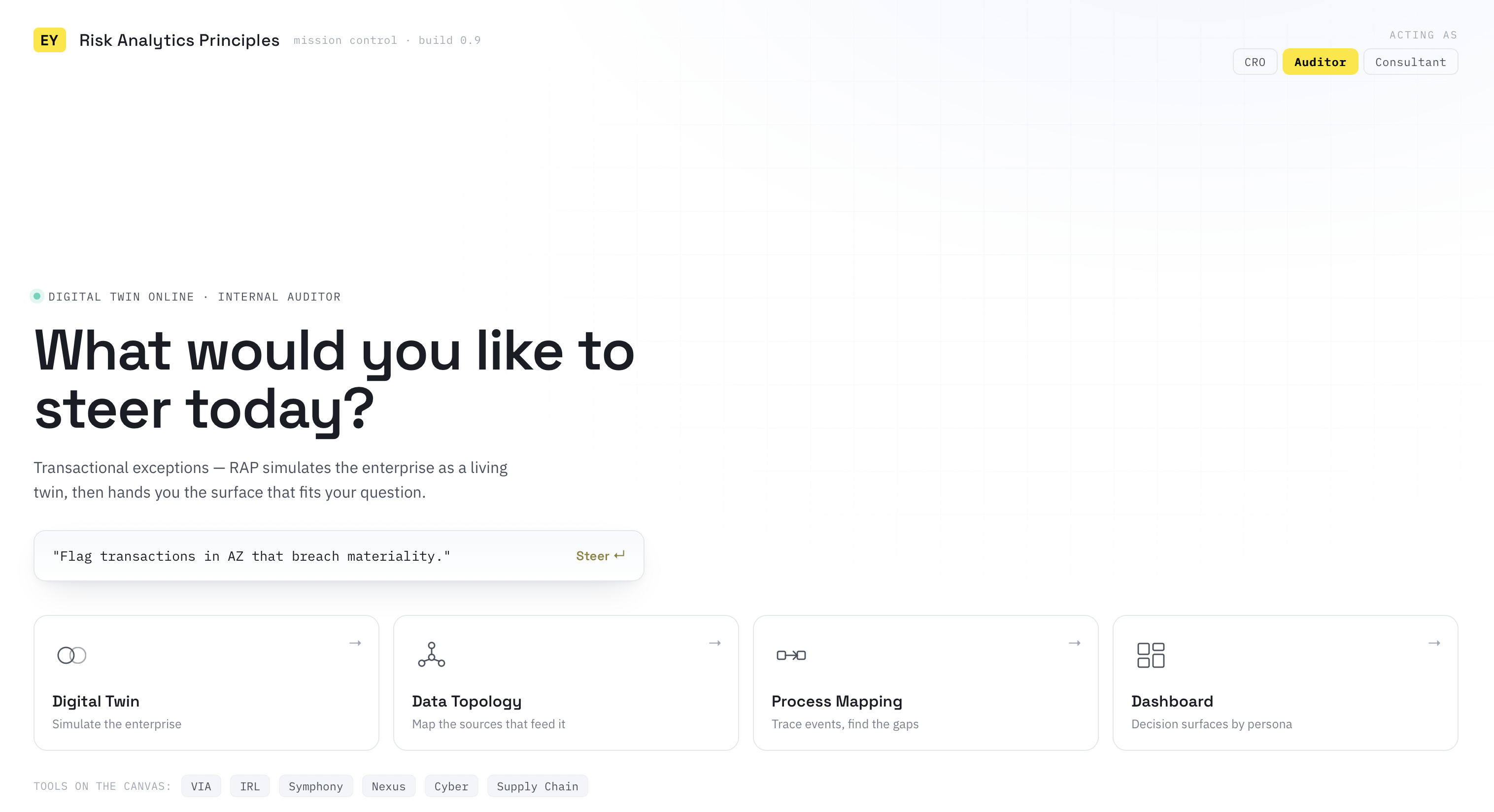
The conversational layer absorbed the difference. A CRO asks "What's our concentration risk in the UKI portfolio if regulatory capital tightens?" An Internal Auditor asks "On SOX Audit 1245, flag transactions in the AZ entity that breach materiality." A Controls Manager asks "Which preventive controls have had failed test attempts in the last quarter?" Same engine. Same data topology. Same digital twin. Different questions into it.
The data topology was deliberately polyglot: SAP/Oracle, generic ERP, documents, images, CSV/Excel — because each persona's evidence sat in a different format and the model had to ingest all of it.
Priya, who opened this case study, doesn't sit neatly in just one of these four boxes — as Risk Manager, her cockpit has to synthesize pieces of all of them. That's exactly the design problem the next section unpacks.
Fig 01Four personas, one engine — four different questions into the same digital twin. The conversational interface absorbs the difference between roles.
05 — Inside the user's head
Read carefully, the Risk Manager wasn't asking for a tool. They were asking for a cockpit.
Before designing screens, we mapped what the central persona — the Risk Manager — needed the product to be:
An interface to connect to client data sources — with a local data location where the user can place files and the system checks and updates them automatically.
A repository of rules that will be utilised for making data consumable — the model's logic, exposed and editable.
A way to present me information that I need to act on — surface-up, not pull-down.
A way to enable me to execute the activities needed to assess risks — the simulation can be driven from the interface itself.
A common interface for accessing different services aligned to business-admin and system-admin needs — i.e., the interface respects roles and entitlements.
Read together, this is a brief for a digital-twin cockpit — not a reporting tool. Connect to my sources, hold the rules, surface what matters, let me act on it, and respect who I am.
PERSONA SPOTLIGHT
Priya — the Risk Manager.
Currently on: SOX Audit 1245
She's the persona this case study keeps returning to. Not because her workflow is the most complex — the CRO's what-if scenarios and the Controls Manager's inventory are arguably harder problems — but because her line from section 02 ("I'm doing context-switching with extra steps") is the complaint every other persona is quietly making too, just about a different set of windows.
Fig 02The Risk Manager's mental model — six asks that, taken together, describe a digital-twin cockpit rather than a reporting tool.
06 — System position
RAP sits between the data, the tools, and the downstream apps. It's a triple bridge.
Synthesising the architecture, RAP sits somewhere no single EY product had sat before. Below it, the client's raw data — SAP, Oracle, ERPs, documents, images. Around it, the EY tool ecosystem — VIA, IRL, Symphony, Nexus, Cyber, Supply Chain — each hosted, not replaced. Inside it, the digital twin itself: a PRC taxonomy, a control-test and KRI library, continuous monitoring, wrapped in ML and NLP. Above it, the downstream apps and third-party GRC tools that consume the model.
RAP isn't an app, and it isn't a dashboard.It's a host environment. Other tools live inside it. The model gets assembled out of what they hold together.
Fig 03The Risk Simulation Stack — five layers, with the digital twin emerging out of the tool panels the canvas holds together.
Fig 04RAP's platform architecture — Analytics HUB platform and EY RAP app side by side, sitting between the client data topology below, the EY tool ecosystem to the left, the EY One Risk Apps above, and third-party GRC tools to the right.
Fig 05The ever-evolving solution cube — five model layers wrapped in ML, NLP, neural networks, and document understanding; surrounded by what the cube delivers (1000+ test scenarios, multi-source ingestion, integrated services, self-service workflow).
Fig 06The three ways of accessing data — tomorrow. Structured ERP extraction, on-prem client workbench, and in-place query all funnel through Analytics Hub into IRL and Risk & Control Monitor, then fan out into the consumption fabric.
07 — The foundational move
Multiple tools, one canvas, two monitors. The infrastructure that made the simulation possible.
This is the design move that everything else stands on. Before the conversation. Before the heat map. Before the uncertainty visualisation. There had to be a canvas that could hold the analyst's actual workflow.
Three principles defined it.
P1Multi-pane in one window.
The right side of RAP isn't a single tile — it's a tileable workspace that can hold multiple tool surfaces at once. The hi-fi shows two panels rendered side by side (Inherent Risk Map + Risk Relations), but the architecture is generalised: any tool surface that respects the RAP integration protocol can appear here. A VIA exception view. An IRL risk-library lookup. A process map overlay. A document evidence panel. Each one can be summoned by the conversation, pinned, resized, and arranged. The four feature tiles on the home screen (Digital Twin, Data Topology, Process Mapping, Dashboard) aren't four features. They're four entry points to the canvas.
P2Shared scope across panels.
When the user pins "SOX Audit 1245" — Priya's audit — as a scope chip, every tool surface in the canvas inherits it. The VIA panel queries against that audit. The IRL panel filters its risk library down to what's relevant. The process map highlights the in-scope process. This is the move that turns "tools side by side" into "a coherent view of the enterprise." Without shared scope, multiple panels are just multiple windows in a different shape. With shared scope, they stop being separate tools and start behaving like organs of a single body.
The user scopes once. The canvas scopes everywhere.
P3Cross-monitor continuity.
Risk analysts work on more than one screen — that's empirically how they operate. The canvas had to follow them. The design allows panels to be popped out of the main RAP window, dragged to a second monitor, and continue receiving scope and conversation updates from the primary session. The analyst's two-monitor setup becomes one logical canvas. A heat map pinned to the secondary monitor stays in sync with a conversation happening on the primary. State doesn't fragment when the workspace physically does.
Why this is the foundation, not a feature: without the canvas, the digital twin has nowhere to live. The "twin" isn't a single visualisation that gets rendered into a tile — it's whatever combination of panels the user has arranged to answer their current question, assembled out of multiple tools, held together by shared scope, and following the user across screens. The canvas is the body of the twin.
Fig 07The canvas — chat-on-left + tileable workspace-on-right hosting multiple tool panels, with scope propagation across all panels and a popped-out panel surviving on a second monitor.
Video 01RAP canvas in action — navigating the multi-tool workspace, conversational steering, and scope propagation across panels.
08 — Structure
In a normal SaaS app, onboarding is signup. In RAP, onboarding is model-build.
The user flow is unusual because the onboarding step is the model-build step. You can't start using RAP without first telling it what to simulate — because the canvas needs to know which tools to load, against which entities, with which data sources mapped.
The flow:
Start — sign in.
Onboarding client — integrating with the GIS parent-tree structure (the organisational hierarchy of the client).
Three parallel admin workspaces must be set up before the canvas can populate:
Set up BU / Digital Twin workspace — define the business unit being modelled.
Set up Data Topology Mapping workspace — declare what data sources feed the twin.
Set up Process Mapping / Process Imprinting workspace — define the process flows and their risk/control overlays.
Home Page — the Risk Analytics Intelligent Service Responder (LLM-led). Conversational. Users can ask questions and upload documents to extend the model in flight.
Two readiness gates before the canvas can render simulation outputs:
Does the system know the events involved in the process risks and controls map?
Did the user map the sources / data topology?
If YES → the Digital / Heat / Inherent Map renders in the canvas, visualising risk in a structured format based on input criteria from the IRL and the digital twin.
If NO → the system asks for the missing inputs before computing.
This looks like an ordinary flow diagram, but it isn't. In a normal app, "missing inputs" is a form-validation problem. In RAP, missing inputs mean the model isn't ready to simulate yet. The decision diamonds aren't UI gates — they're simulation-readiness gates.
The interface refuses to lie by computing on insufficient inputs.
Fig 08The simulation flow — onboarding is model-build, and the readiness diamonds are model gates, not UI gates. The interface refuses to simulate on insufficient inputs.
09 — Design decisions
Four moves on top of the canvas. Each one is a response to a property of the underlying model.
The canvas is the foundation. What sits on top of it are four further design moves. Each maps to a specific property of the simulation underneath.
MOVE 01
Conversation as the steering wheel.
Designed against: the cognitive cost of operating multiple tools manually.
The home page leads with a chat ("Hey there! What would you like to do today?") rather than a navigation tree. A risk consultant types a multi-clause intent — "Identify and monitor high-impact risks to flag exceptions within transactions posted in SAP processes configured for the UKI business entities of AZ" — and the system clarifies in turn ("On which audit would you like to flag exceptions?"). The user narrows ("SOX Audit 1245"), and the model begins computing ("Sure, setting up the inherent heat map for you"). The conversation is not a chatbot wrapper. It's the way the user instructs the canvas about what to load, what to compute, and what to show.
MOVE 02
Side-by-side workspace: conversation on the left, simulation output on the right.
Designed against: the trust gap.
When the heat map renders, it appears next to the conversation that produced it — not on a new screen. The user can read their own request, the system's clarifying turn, the scope token, and the resulting Inherent Risk Map and Risk Relations side by side. The visualisation is anchored to the conversation that conditioned it. This is a deliberate move against the failure mode of dashboards: a chart with no provenance.
MOVE 03
Persistent scope tokens.
Designed against: context loss across multiple panels.
"SOX Audit 1245" doesn't just appear in the chat — it pins as a scope chip and propagates across every panel in the canvas. Multiple chats can run in parallel ("Chat One", "New Chat") and each carries its own scope. The model always knows which slice of the twin it's reasoning over, in which panel, for which conversation.
MOVE 04
Action verbs at the foot of the chat, not the head of the page.
Designed against: the opacity of AI outputs.
The bottom navigation exposes four meta-operations on analytics: Customise · Discover · Register · Execute. These are deliberately verbs of user agency over the model — not nouns of content to be consumed. The user is not browsing reports. The user is participating in the model's lifecycle: tuning it, discovering what's inside it, registering new analytics into it, executing runs against it.
Fig 09The conversation–simulation pairing — each turn maps to a canvas state; scope tokens persist across both.
10 — The unprecedented part
Three UX problems that don't exist in a dashboard world.
Because RAP is a simulation rather than a report, three UX problems arose that have no clean prior art. These are the most important sections of this case study.
P01Visualising uncertainty.
A heat map in RAP is not a chart. It's a probability distribution. Every cell encodes severity × likelihood, and the likelihood is computed by the model with confidence bounds. The design question is unforgiving: do you expose the confidence bounds (rigorous, but visually noisy), or collapse them into a single colour (clean, but lies by omission)?
The move: a two-layer visual encoding.
The dominant colour expresses the expected severity-likelihood product.
A secondary visual treatment — a stroke weight or an opacity differential — encodes the model's confidence in that estimate.
High-confidence cells read as crisp. Low-confidence cells read as softer-edged. The user learns to scan crispness as a proxy for trustworthiness without having to read confidence intervals.
The picture carries the uncertainty.
Fig 10Uncertainty visualisation framework — two-layer encoding where colour expresses expected risk and stroke weight expresses model confidence.
P02Showing what-if scenarios.
A what-if scenario is fundamentally a comparison: "If I change X, the heat map shifts like this." The temptation is to redraw the heat map every time the user perturbs an input. The better move is to render the delta — a diff layer over the baseline — so the user can see exactly which cells moved, and by how much.
The flow:
User pins a baseline scenario.
User perturbs an input (a control is removed; a regulation tightens; a transaction routing changes; a region scales).
The system re-runs the simulation against the baseline.
The interface overlays the new state with an animated transition.
The user can toggle baseline / new-state / diff at any moment.
The user sees the change, not just the result. A heat map that just refreshed silently is a lie of omission. A heat map that animates the delta is an honest answer. And because the canvas can hold multiple panels at once, the baseline and the perturbed state can sit side by side — the user can run two simulations in parallel and read the diff visually rather than computationally.
Fig 11The what-if loop — perturb, re-simulate, overlay the diff, adjust. The user sees change, not just result.
P03Helping users make decisions from a model.
A model output is not a decision. A cell that reads "high severity, high likelihood, low confidence" doesn't tell a CRO what to do. The interface has to bridge from model output to recommended action.
The move: every elevated risk cell exposes three follow-up actions in a side panel:
Investigate — drill into the underlying transactions and evidence (opens a VIA panel in the canvas).
Escalate — route to the appropriate downstream app (Audit, ICM, Issue Tracker — opens that app's panel in the canvas).
What-if — open a scenario sandbox against this specific cell (pins a new panel for the perturbation).
Each follow-up action expands the canvas with another tool surface — which is why the canvas had to come first. Without it, the bridge from prediction to action has nowhere to land.
A model that returns a probability is doing half its job. The interface has to do the other half — turn the probability into a decision someone can defend.
11 — What this project taught me
Designing for AI-assisted digital twins is a new design discipline. Six takeaways.
TAKEAWAY 01
The container is the model.
The most important lesson is that the fragmentation problem and the model-building problem turned out to be the same problem. Solving for "multiple tools in one canvas with shared scope and cross-screen continuity" is what produced the substrate for the digital twin. The container isn't a precursor to the model — it is the model's body.
TAKEAWAY 02
The interface is the simulation.
The conversation is how the user conditions the simulation; the heat map is what the simulation returns under that conditioning; the canvas is the workspace in which the conditioning and the return co-exist. These three components are one interaction surface — not a window onto something separate.
TAKEAWAY 03
Uncertainty is a design problem.
The model knows its confidence. The dashboard refuses to. Bridging that gap — finding visual encodings that carry confidence alongside expected value — is squarely a designer's responsibility. It cannot be deferred to the data science team.
TAKEAWAY 04
Conversation is steering, not chatbotting.
The chat in RAP isn't FAQ retrieval. It's the user articulating scope, constraints, and assumptions to a model that then computes — and to a canvas that then assembles panels around the answer. Multi-clause intent, structured clarification, persistent scope tokens, deliberate handoff from "describing" to "looking at."
Four roles. Each with a different decision surface (CRO needs concentration; Auditor needs flags; Controls Manager needs effectiveness). But they all query the same twin through the same canvas. Keep the engine unified; let the conversation route persona to panel combination.
TAKEAWAY 06
The hardest UX work in AI is the bridge.
A probability is not a decision. A heat cell is not an action. Designing the bridge — Investigate / Escalate / What-if, each opening another panel into the canvas — is the difference between an AI product that's interesting and an AI product that's useful.
A dashboard would have told Priya what already went wrong on SOX Audit 1245. RAP tells her what's about to — with a number attached to how sure it is, and three ways to act before it does. That's the whole distance between a container and a twin.