Ernst & Young · Embedded GenAI · Risk & Audit

Embedding AI into the workflow — not beside it.

GenIAus worked. But nobody wanted to leave their page to use it. Genie answered the harder question: can we bring AI intelligence to the exact moment and place where auditors actually need it — without breaking their workflow or their trust?

ClientErnst & Young
RoleProduct Designer
TeamVP Product · Motion · Dev
Year2023–2024
−60%Context-switching between tools
~45sTime-to-first-query (was 4 min)
72%Selected sources before prompting
58%Used Page Awareness in sessions
+28%Increase in trust rating

GenIAus worked. Nobody wanted to leave their page to use it.

After shipping GenIAus as a standalone AI product, the adoption data told a clear story: users valued what the AI could do but resented having to context-switch to access it. An audit manager reviewing a risk dashboard with 851 risks across 3 locations and 10 legal entities shouldn't need to open a separate tool, re-select their files, and re-establish context just to ask the AI a question about what's already on their screen.

The strategic question shifted from "Can we build an AI tool for auditors?" to "Can we bring AI intelligence to the exact moment and place where auditors need it?"

This is what led to Genie — a contextual AI chat widget designed to live inside existing enterprise tools, not alongside them.

A destination became an ambient presence.

Genie wasn't a feature addition to GenIAus. It was an architectural rethinking of how AI should relate to the user's workflow. GenIAus was a destination — you go to it. Genie was an ambient presence — it comes to you. This distinction drove every design decision.

I worked directly with the VP of Product to define the product strategy across three pillars:

Technology. Establishing experience design operations and customer insights frameworks that could inform AI behavior across multiple tools — not just audit.

People. Designing for user trust, agency, and control in a domain where AI skepticism runs high and professional liability is real.

Business. Aligning Genie with EY's broader digital transformation — creating a scalable AI interaction layer that could eventually serve as the foundation for AI-assisted workflows across the entire VIA ecosystem.

Technology People Business Vision & Strategy Outcome 01 Experience Design Operations Outcome 02 Customer Insights & Metrics Outcome 03 Leadership & Governance Outcome 04 Customer Focus as Culture
Fig 01Product strategy framework — Technology, People, and Business as interconnected pillars around a shared Vision & Strategy core. Each pillar carried specific design operations and governance requirements that shaped Genie's architecture.

A chat panel on the side of the screen. Deceptively simple.

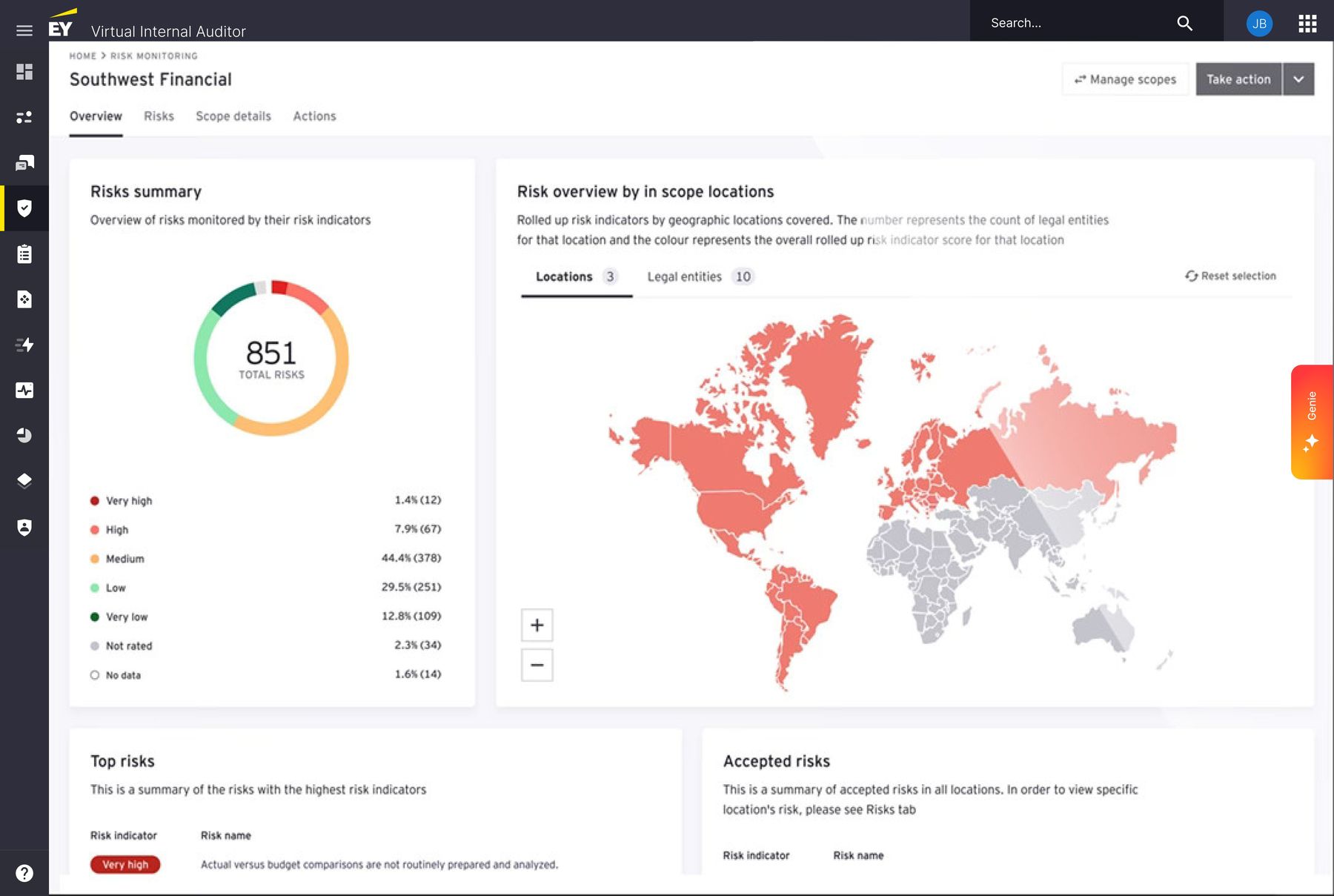
Dense information in limited space. The Risk Monitoring dashboard is already information-heavy — donut charts, geographic heat maps, risk tables, entity breakdowns. Adding an AI panel couldn't compete for attention; it had to complement the existing density without overwhelming it.

Long response times. Genie queried multiple data sources simultaneously — document stores, help centers, internet, and live page content. Responses were slower than a typical chat interaction, creating a risk of reduced trust and perceived lack of control.

Multiple contexts of use. Unlike GenIAus, which had a single context (standalone), Genie needed to behave differently depending on how deeply it was integrated into the user's current task. A generic Q&A is different from a page-aware response is different from a task-embedded action.

Surface. Context. Embedded.

I designed Genie around a layered integration model — three distinct contexts of use, each with increasing depth of contextual awareness.

Genie Widget Layer 01 · Surface Page Awareness Layer 02 · Contextual Deep Integration Layer 03 · Embedded What it does Global presence — accessible from every screen Generic Q&A on demand Conversation history within reach What it does Toggle on / off — user keeps control Reads & references the embedded page content What it does Genie sits inside the user flow itself Can assist & generate answers in-task Helps users complete real workflows end-to-end
Fig 02Three layers of integration — from global widget (surface) to page awareness (contextual) to deep integration (embedded). Each layer increases the AI's contextual depth while preserving user control over how much intelligence is active.
01
Genie Widget

The surface layer. A collapsible chat panel accessible from any page in VIA. Generic Q&A, conversation history, prompt library access. Globally present, contextually unaware — useful for general questions about audit processes, standards, or help-center content.

02
Page Awareness

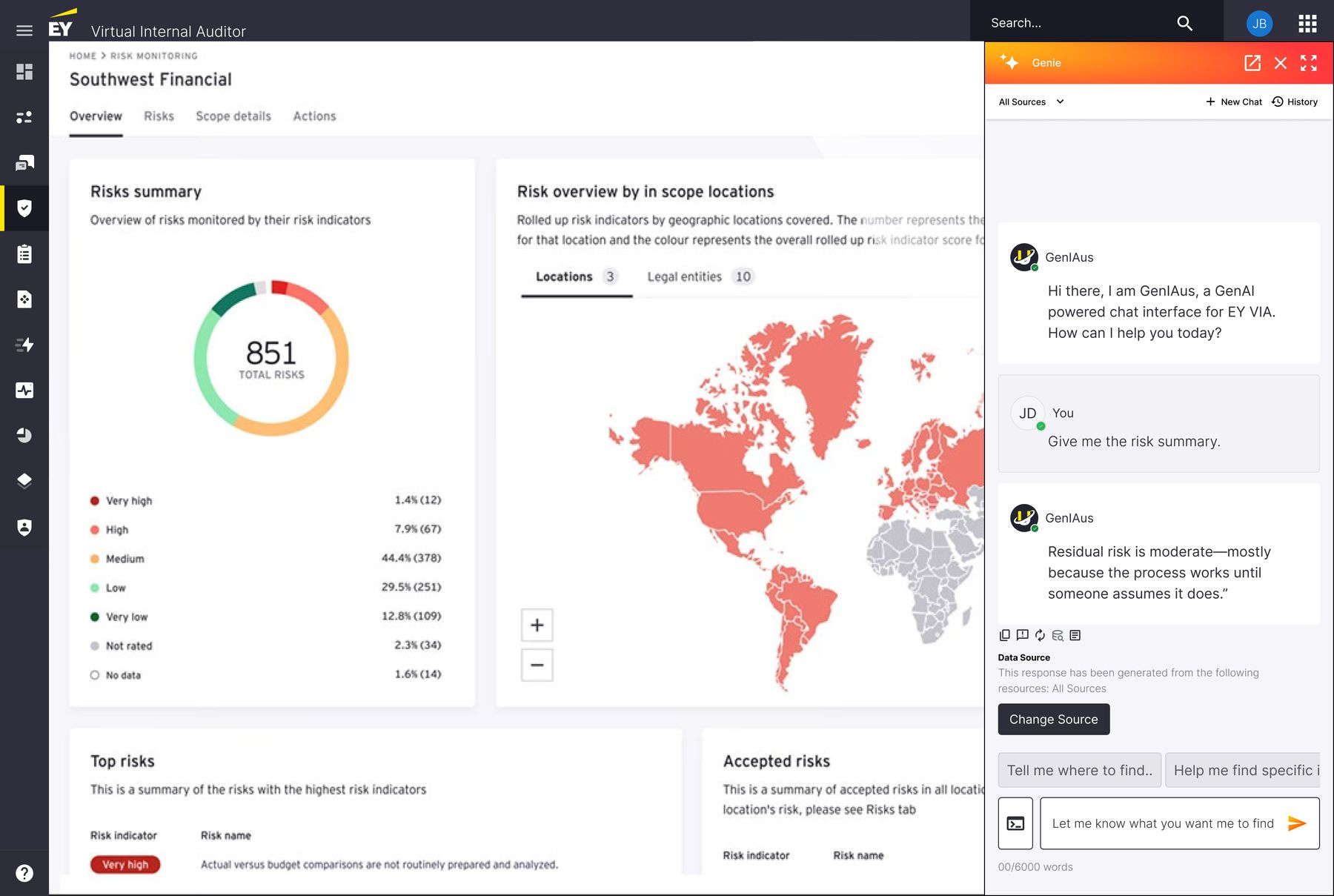
The contextual layer. When toggled on, Genie reads the embedded content of the current page. On the Risk Monitoring dashboard it understands the 851 risks, severity distribution, geographic and legal-entity breakdowns. Queries become contextual: "Give me the risk summary" returns data-grounded answers, not generic ones.

03
Deep Integration

The embedded layer. Genie becomes part of the user flow itself — assisting with task completion, generating pre-filled content, providing structured guidance within forms and workflows. The future state the architecture was designed to support.

Seven decisions. One coherent system.

Each decision below was a deliberate response to a specific design problem — the constraint, the resolution, and the reasoning behind it.

01
The widget — always present, never intrusive.

The Problem

How do you make an AI assistant available on every page without it dominating the interface or distracting from the primary task?

The Decision

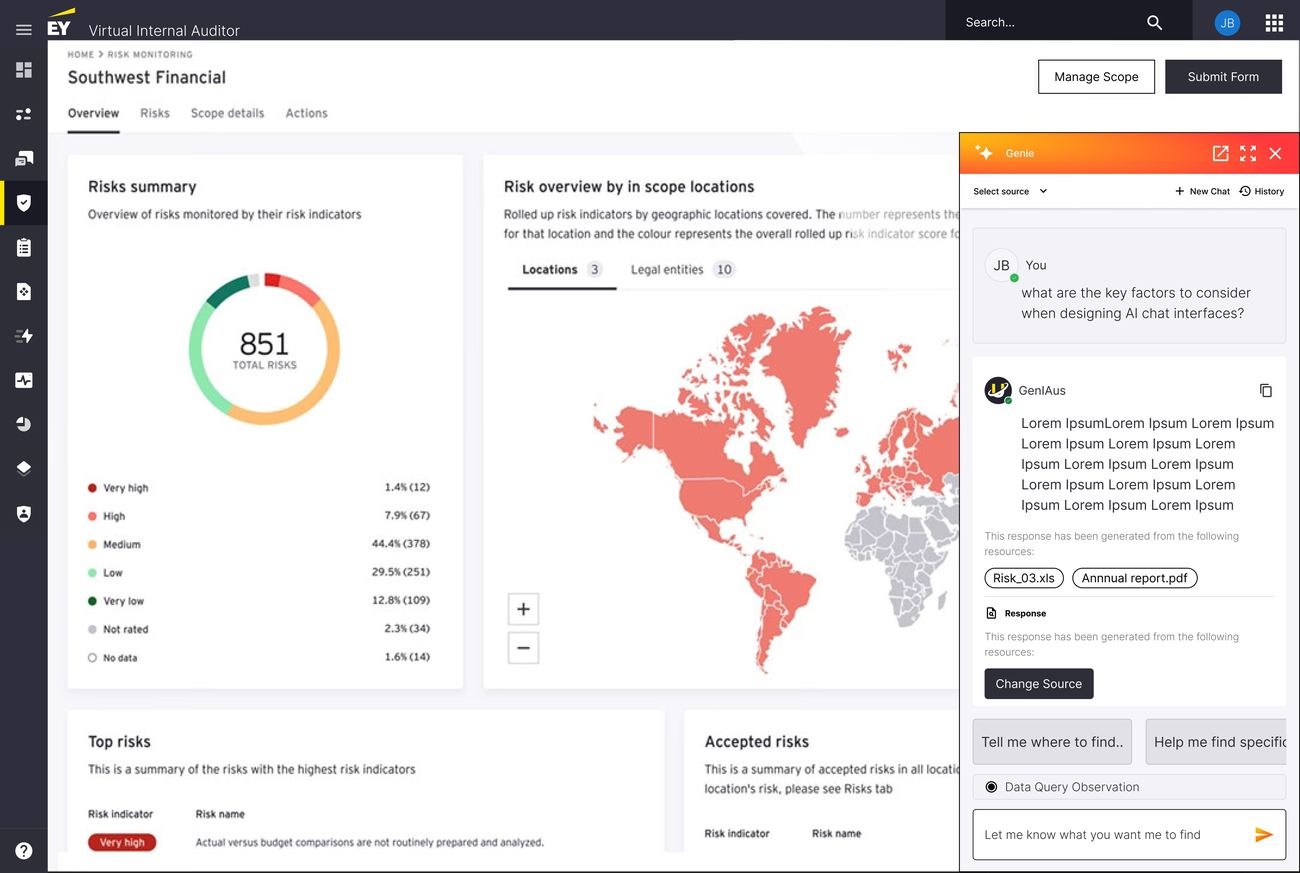
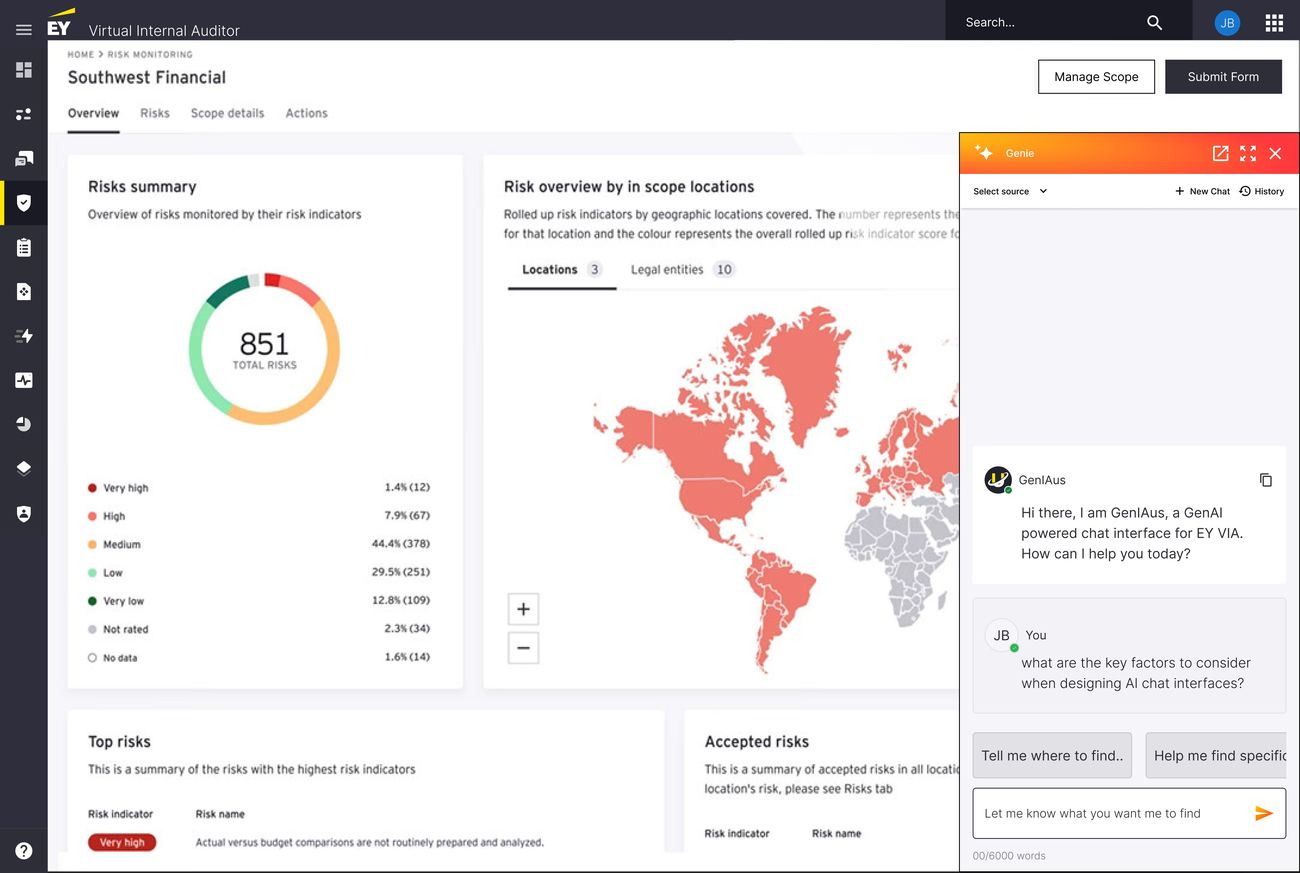
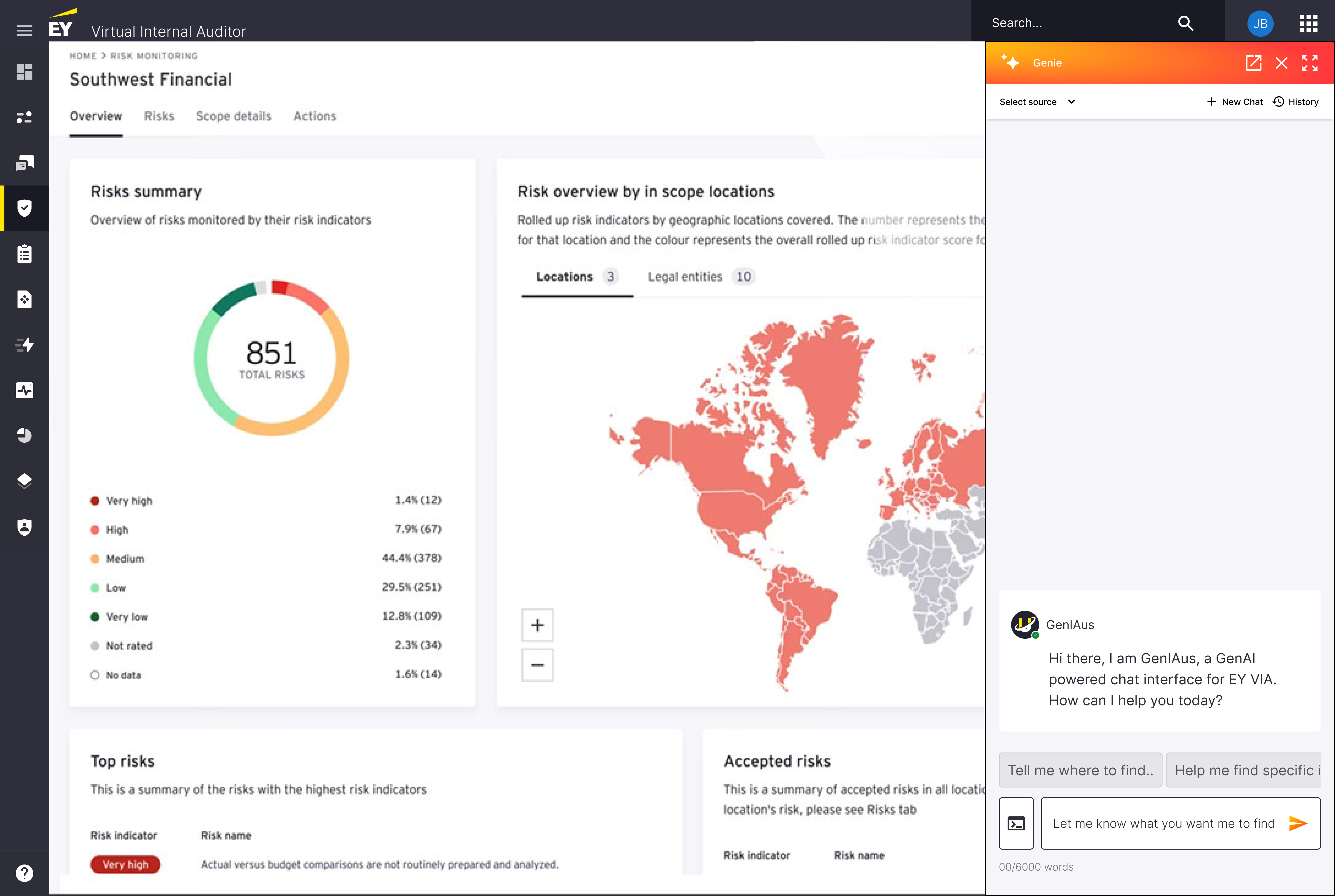
A collapsible side panel anchored to the right edge. Collapsed: a minimal vertical tab in orange with the Genie spark icon, occupying almost no visual space. Expanded: overlays the right portion of the dashboard at a fixed width, leaving most of the primary content visible. A distinct visual identity — orange header, Genie spark, dedicated chat bubbles — separates AI content from VIA's verified system data.

Why It Works

The user stays on their page. Their context is preserved. The AI is one click away, not one navigation away. Visual separation prevents the dangerous ambiguity of AI outputs being confused with verified system data.

Genie widget collapsed on the right edge of the Risk Monitoring dashboard
Fig 03The Genie widget on the Risk Monitoring dashboard — always accessible via the orange tab on the right edge, never intrusive. One click expands the full chat panel without leaving the page.
02
Resource selection before prompting — user agency over AI scope.

The Problem

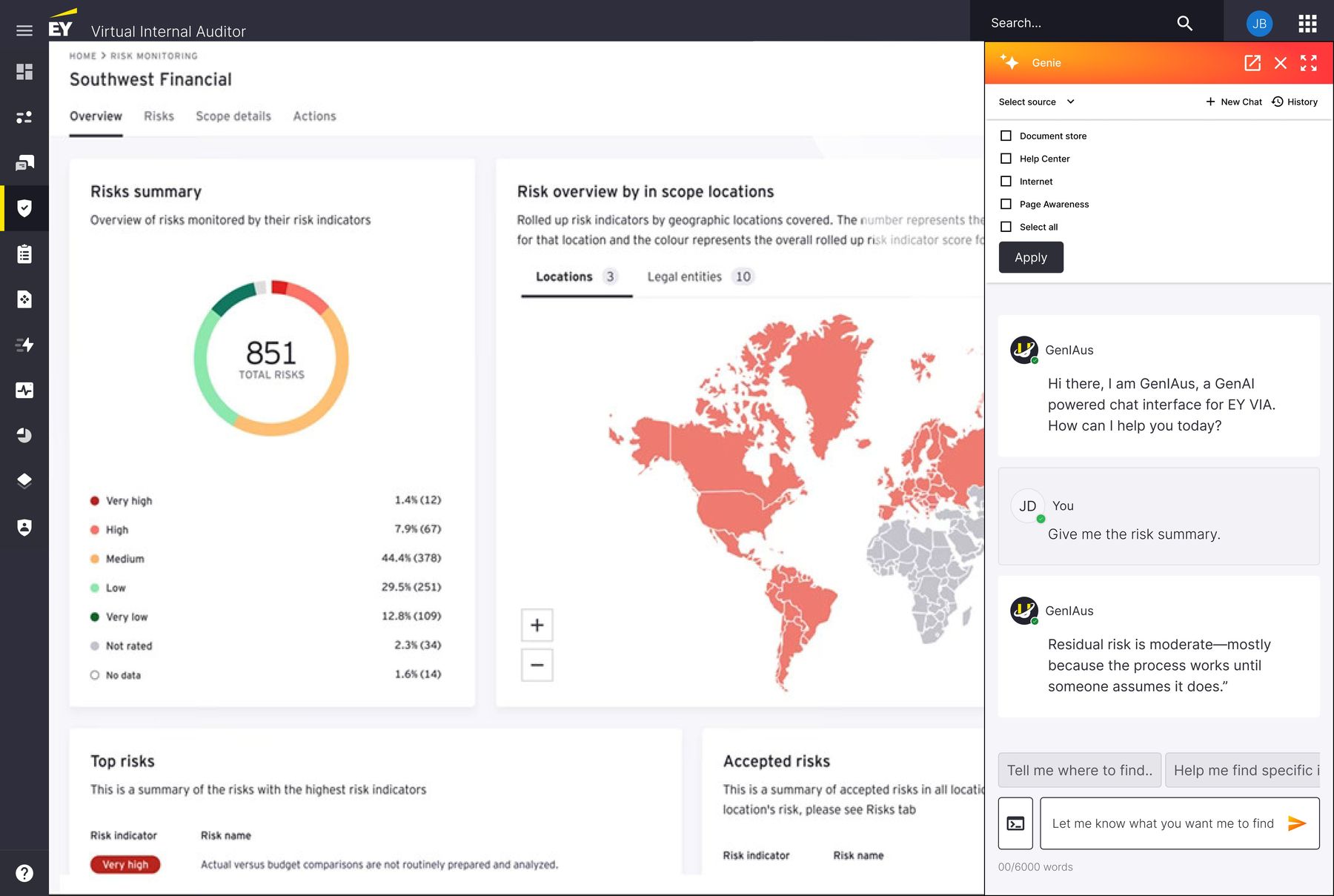
Genie could query multiple data sources — document stores, help centers, internet, live page content. But users in a regulated environment need to know and control where their AI is pulling information from. Querying everything by default was technically easy but experientially wrong.

The Decision

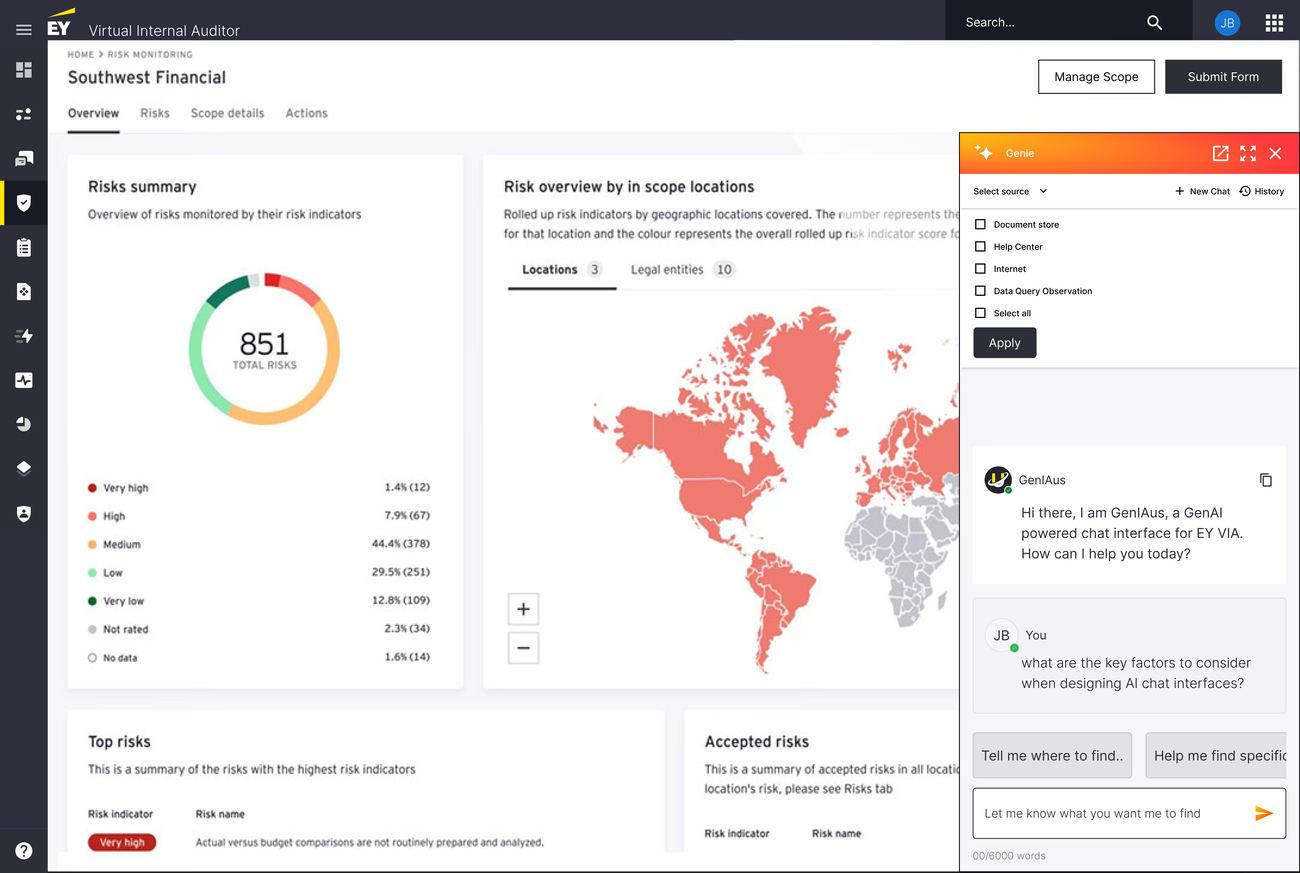
A "Select source" dropdown at the top of the chat panel with explicit checkboxes: Document store, Help Center, Internet, Page Awareness, Select all. Users choose their data sources before prompting — or change them mid-conversation.

Why It Works

It solves two problems at once. It gives users agency: an auditor preparing an internal report may want to restrict queries to the document store only, excluding internet sources. And it improves response time: narrowing the source scope reduces the number of APIs the system queries — directly addressing the long-response-time constraint.

Resource selection dropdown with checkboxes for Document store, Help Center, Internet, Data Query Observation, Select all, plus an Apply button
Fig 04Resource selection — users explicitly choose which data sources Genie queries. Not buried in a settings panel; a first-class interaction at the top of every conversation.
03
Page Awareness — AI that sees what you see.

The Problem

The most powerful use case for an embedded AI is answering questions about the content the user is currently looking at. But "page awareness" is a technical capability — it needed to be communicated as a user-facing concept with clear boundaries.

The Decision

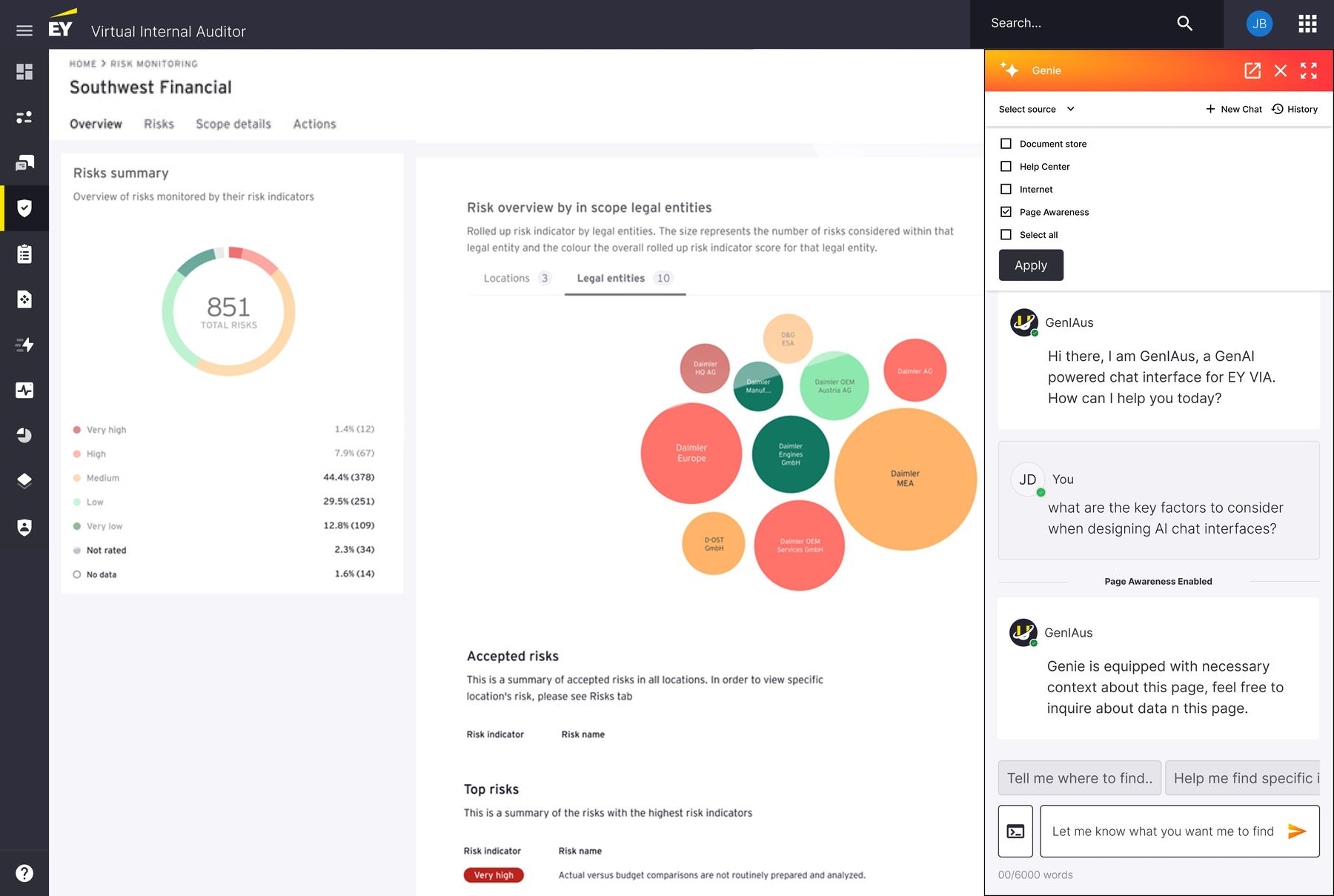
Page Awareness is a named, toggleable resource in the source selection dropdown. When enabled, the chat displays a "Page Awareness Enabled" badge as a visual separator in the conversation thread. Genie explicitly acknowledges the context shift: "Genie is equipped with necessary context about this page, feel free to inquire about data on this page."

Why It Works

Making page awareness explicit — rather than silently enabled — builds trust. Users know exactly when the AI is reading their page and when it isn't. The badge in the conversation thread creates a clear before/after boundary, so users can distinguish between generic responses and contextually grounded ones.

Page Awareness Enabled badge mid-conversation, with Genie acknowledging it has context about the current dashboard
Fig 05Page Awareness enabled — the AI explicitly confirms it has context about the current dashboard, and a visual badge marks the shift in the conversation. Users always know when the AI is reading their screen.
04
Source transparency — showing your work.

The Problem

In audit and risk management, the source of information matters as much as the information itself. An AI response without attribution is an opinion. An AI response with citations is a reference point.

The Decision

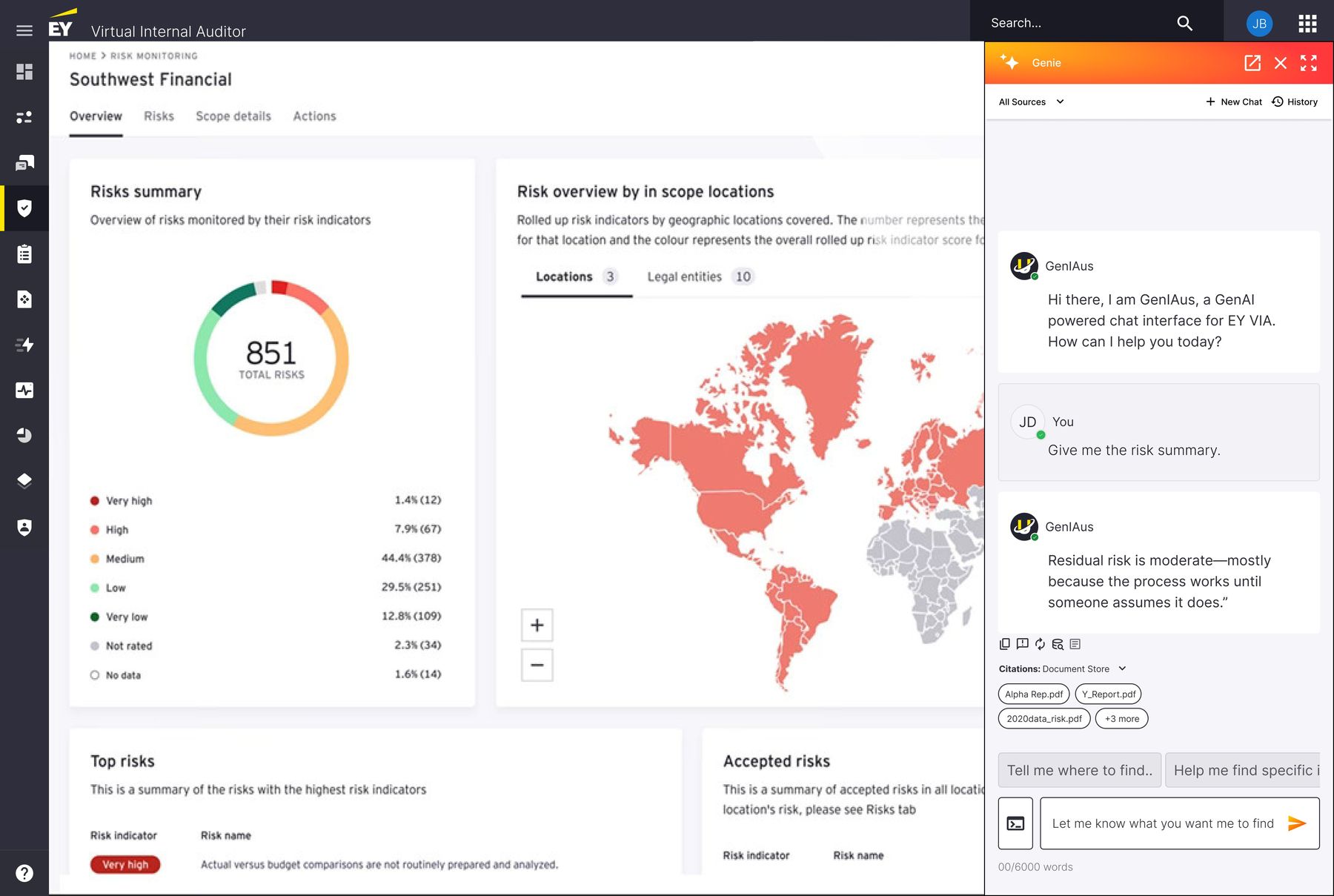
Every AI response includes a Citations section showing exactly which documents informed the answer. Citations are collapsible, showing the source type (e.g., "Document Store") and individual document names (Alpha Rep.pdf, Y_Report.pdf, 2020data_risk.pdf, +3 more). Each citation is clickable, allowing users to trace the AI's reasoning back to its source material.

Why It Works

It transforms the AI from a black box into an accountable assistant. Auditors can verify the AI's claims against source documents — exactly what their professional standards require. The citation pattern also creates a natural quality signal: if the AI cites irrelevant documents, the user knows to re-query.

Source transparency — citations appearing inline with an AI response, listing Alpha Rep.pdf, Y_Report.pdf and others
Fig 06Source transparency — every response includes clickable citations showing exactly which documents from the Document Store informed the answer. Trust through traceability.
05
Dynamic resource switching — control without starting over.

The Problem

Users often realize mid-conversation that they want to query a different data source. In the initial model, this would require starting a new chat — losing all conversation context.

The Decision

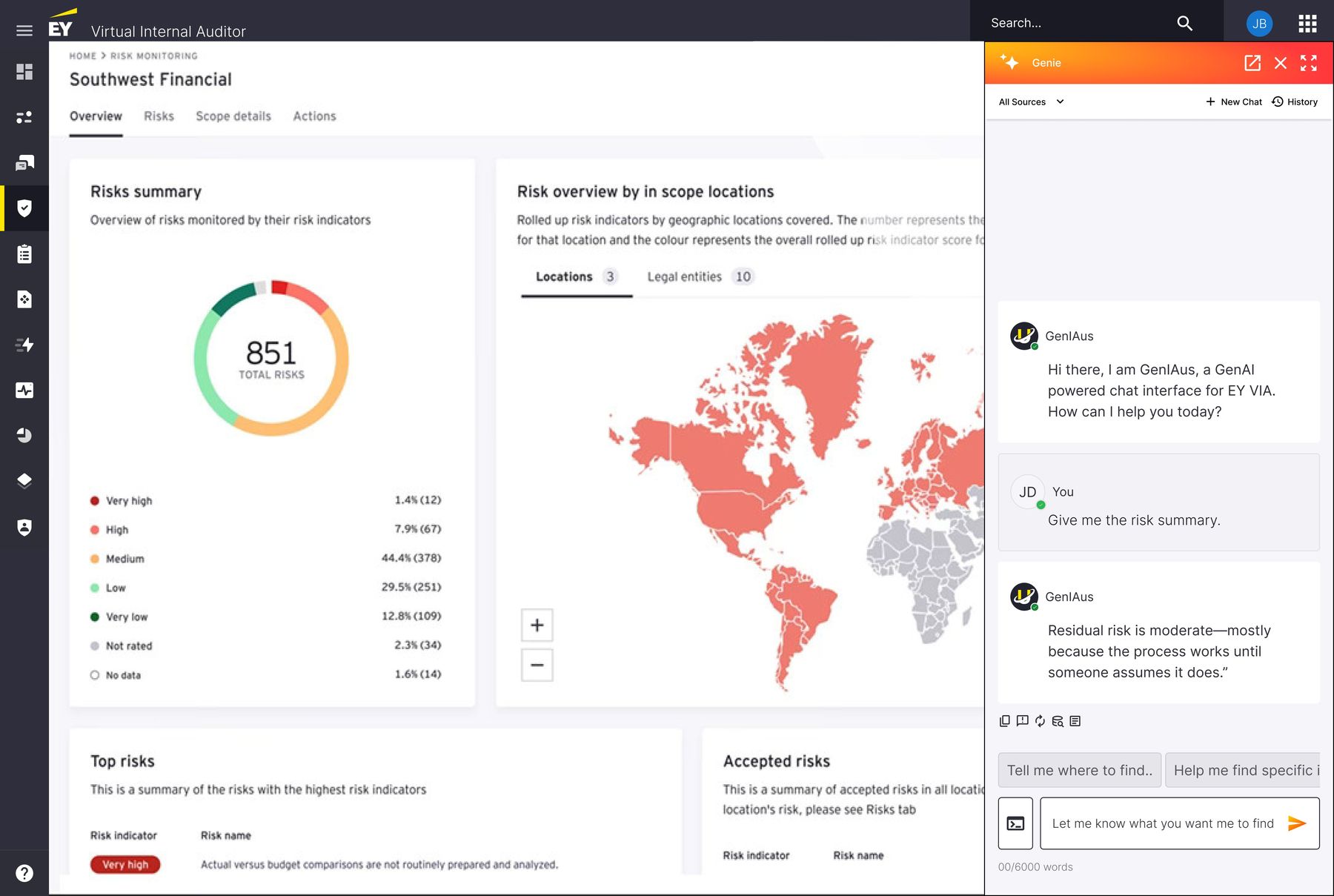
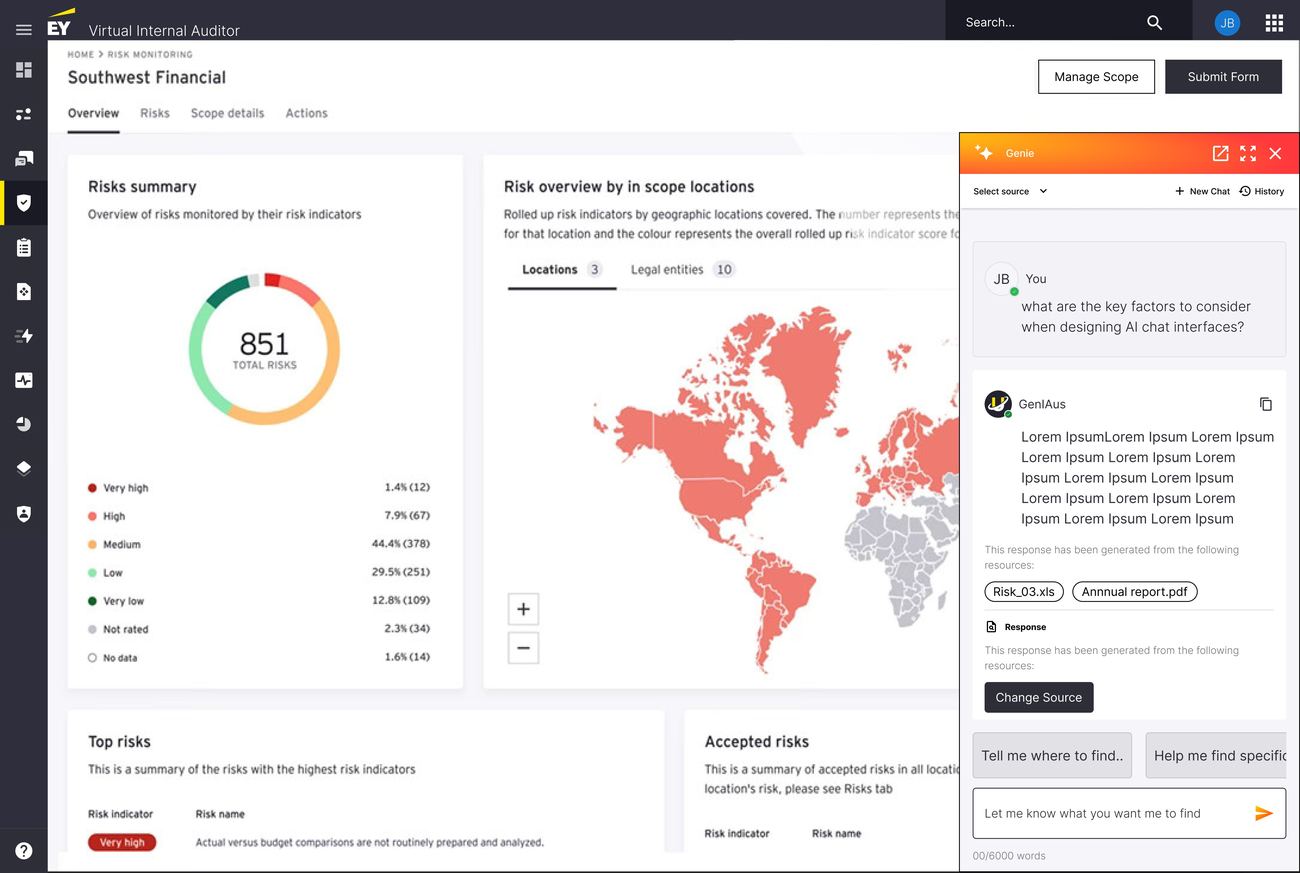
A "Data Source" label under each response shows which resources generated that specific answer. A "Change Source" button lets users switch sources mid-conversation without losing the thread. The next response is generated from the newly selected sources while the previous conversation context is preserved.

Why It Works

It treats data source selection as a per-response decision, not a per-session setting. This mirrors how auditors actually work — they might start with document store queries, cross-reference against internet sources, then narrow down to page-specific data, all within a single analytical thread.

Dynamic resource switching — a Change Source button under an AI response, with the source label visible above it
Fig 07Dynamic resource switching — users can change data sources mid-conversation without losing context. The Data Source label and Change Source button make source management a fluid part of the interaction, not a system setting.
06
Response control & feedback — the user stays in charge.

The Problem

Enterprise AI tools often present responses as final and authoritative. But audit professionals need to manipulate, verify, and refine AI outputs before they can use them.

The Decision

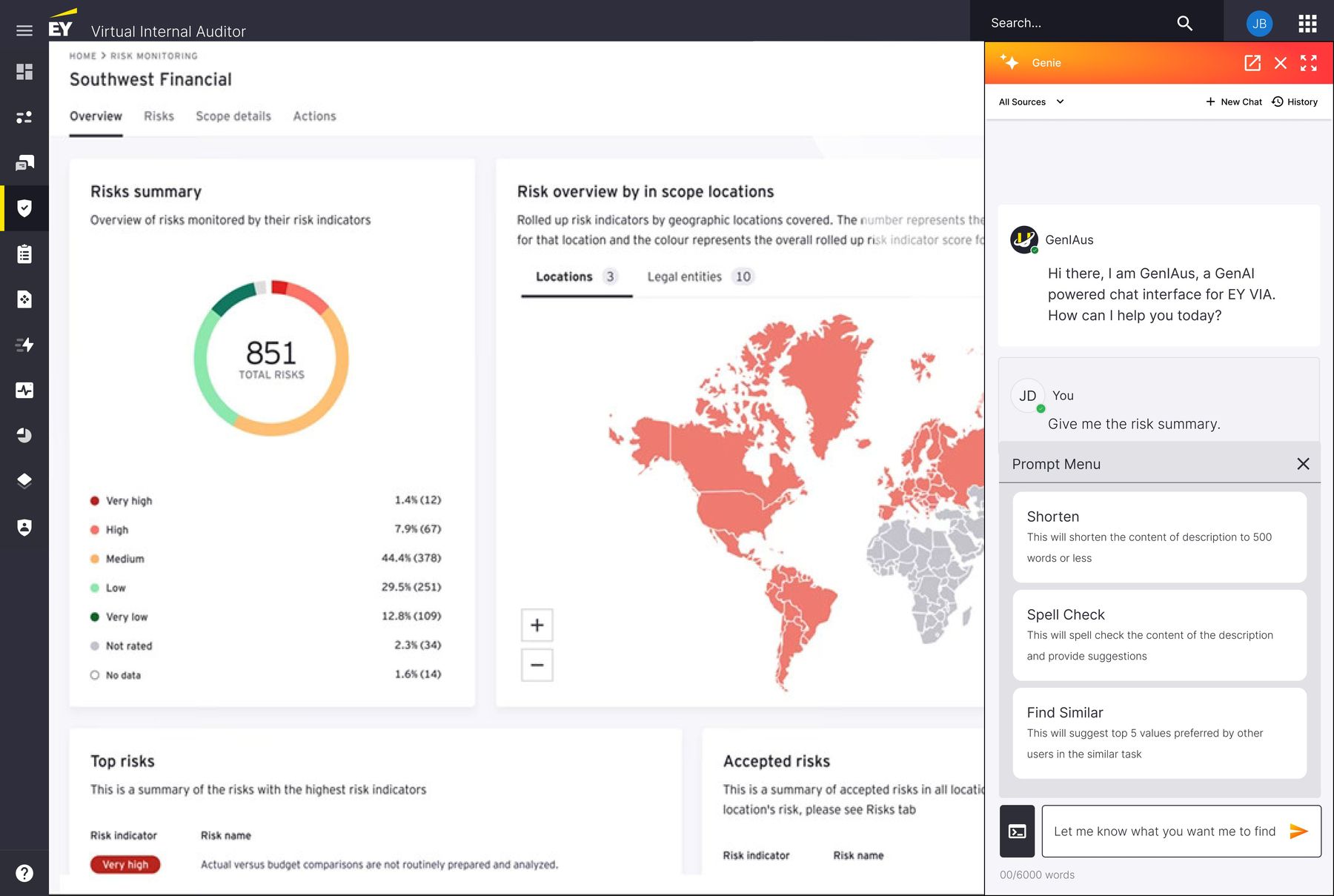
Every AI response includes an action toolbar with five inline options: copy, compare, regenerate, share via email, export. These aren't hidden in menus. The Prompt Library provides additional control: Shorten (condense to 500 words), Spell Check, Find Similar (surface related entries from other users).

Why It Works

It positions the AI as a starting point, not an endpoint. The user always has the next action — refine, redistribute, or regenerate. This is critical for adoption in environments where AI outputs are inputs to human judgment, not replacements for it.

Response control toolbar — copy, compare, regenerate, share, export icons inline below an AI response
Fig 08Response control — copy, compare, regenerate, share, and export actions on every response. Plus a Prompt Menu for post-response refinement: Shorten, Spell Check, Find Similar.
07
Prompt library — task-specific intelligence.

The Problem

The embedded widget had even less screen real estate for prompt scaffolding than standalone GenIAus. But users still needed guidance on what to ask.

The Decision

A Prompt Menu accessible from within the chat, offering task-specific actions rather than generic suggestions. "Shorten" condenses content. "Spell Check" reviews for errors. "Find Similar" surfaces comparable entries from other users' workflows. These are operational prompts — they do things, not just ask things.

Why It Works

In a compact widget, every pixel matters. Instead of displaying 4 prompt suggestions taking up screen space, the prompt library lives behind a single icon and offers deeper, more actionable options. "Find Similar" essentially lets the AI learn from collective team behavior.

Prompt menu in the widget showing Shorten, Spell Check, and Find Similar actions
Fig 09Prompt library in the widget — task-oriented actions (Shorten, Spell Check, Find Similar) rather than generic question suggestions. Optimized for the compact widget format.

Building the chat-focused AI library EY didn't have.

A critical part of this project wasn't just designing Genie — it was building the design infrastructure to support it.

EY's existing design libraries had no components for conversational UI, AI states, loading behaviors, citation patterns, or source selection mechanics. I built a dedicated AI/chat-focused design system from scratch, including components for chat bubbles (user vs. AI), source dropdowns, citation blocks, feedback actions, loading states, and the three states of the widget (collapsed, standard, expanded).

I also created a distinct visual identity for Genie — separate from both VIA's dark theme and GenIAus's standalone branding. The orange accent color, the spark icon, and the card-based response format all serve to make AI content immediately recognizable within any host tool.

This design system wasn't just for Genie. It was designed to be the foundation for AI interactions across EY's entire product suite — portable enough to embed in any tool, consistent enough to build user familiarity across products.

Research that changed the product.

Shipping Genie's first iteration was only half the job. The harder question was whether the new features — Data Source Selection and Data Query Observation (later renamed Page Awareness) — were actually understood and adopted by real users.

I led a structured research program to find out.

The research question: "How might we ensure that Genie's new features are intuitively understood and seamlessly integrated into the auditor's existing workflow?"

Remote, moderated, think-aloud.

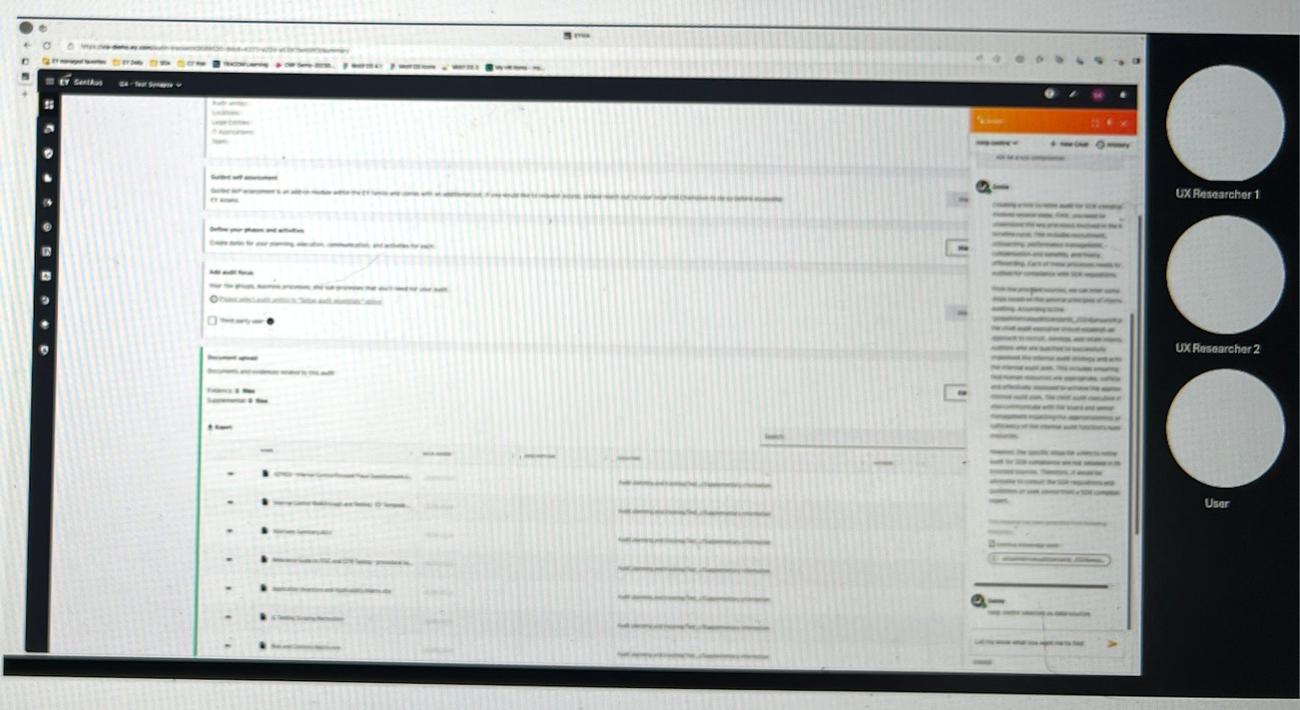
I conducted remote moderated usability testing via Microsoft Teams with audit professionals — the actual end users. Participants were tasked with interacting with both new features while I observed their behavior, moderated the sessions, and captured detailed notes.

The testing protocol followed a structured format: a 5–10 minute introduction to establish context, 30–60 minutes of task-based testing using think-aloud protocol with guided follow-up questions, and a 5–10 minute debrief to capture final impressions and unspoken reactions.

Screenshot of remote usability testing session — multiple researchers observing a participant interact with Genie inside VIA on a shared screen
Fig 10A remote usability session in progress — participants interacted with Genie's features on the live VIA platform while UX researchers observed behavior and captured insights in real time.

Two users. Two mental models.

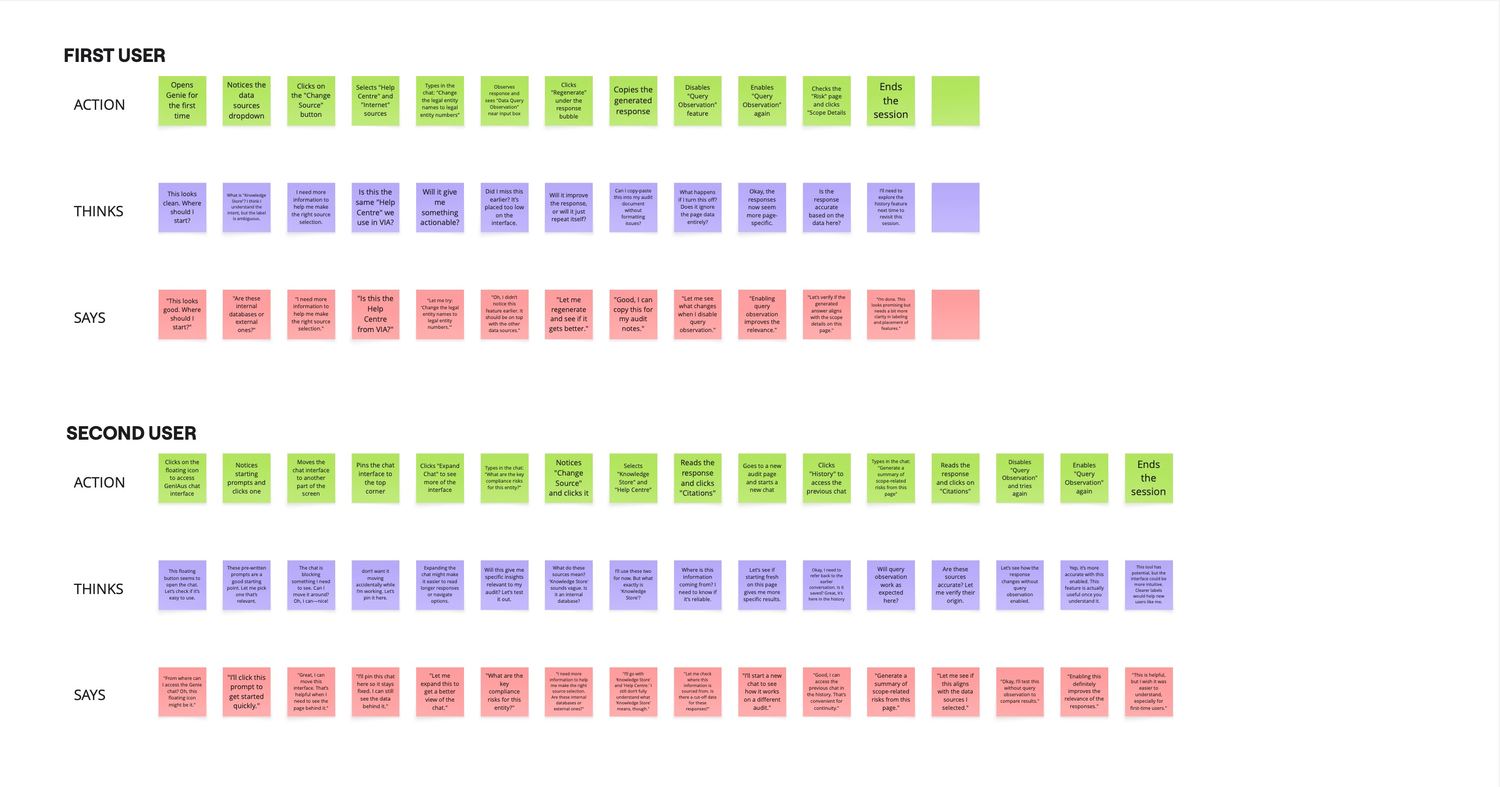
I mapped each participant's complete session as an Action → Thinks → Says journey, capturing every click, hesitation, and verbal reaction.

User 1 opened Genie, immediately noticed the data sources dropdown, but hesitated at "Knowledge Store" — thinking "What is Knowledge Store? I think I understand what it is, but the label is unclear." They selected Help Centre and Internet, typed a query, then noticed Data Query Observation near the input box. Their reaction: "Did I miss this earlier? It's placed too low on the interface." They toggled it on and off to compare responses, copied the generated output, then explored the Risk page to verify accuracy. Their final thought: "I'll need to explore the history feature next time to revisit this session."

User 2 took a different path — clicking the floating icon, noticing the pre-written prompts as a starting point, then moving the chat widget around the screen. They pinned it to the top corner, expanded it for better readability, then dove into source selection. When they saw "Knowledge Store," they asked directly: "What are these sources? Are these internal databases or external ones?" They selected Knowledge Store and Help Centre, read the citations on the response, then navigated to a new audit page to start a fresh chat. On returning to the first page, they enabled Query Observation and noted: "Yes, it's more accurate with query observation enabled."

The two journeys revealed the same core insight from different angles: users were willing to explore and learn, but ambiguous labels and buried features created unnecessary friction that slowed them down.

Action-Thinks-Says journey map for two users across multiple session steps, with sticky notes in green, purple, and pink
Fig 11Action → Thinks → Says journey maps for two test participants. Each row tracks a user's complete session — every click, internal thought, and verbal statement — revealing where the design supported discovery and where it created confusion.

What users think, feel, and do.

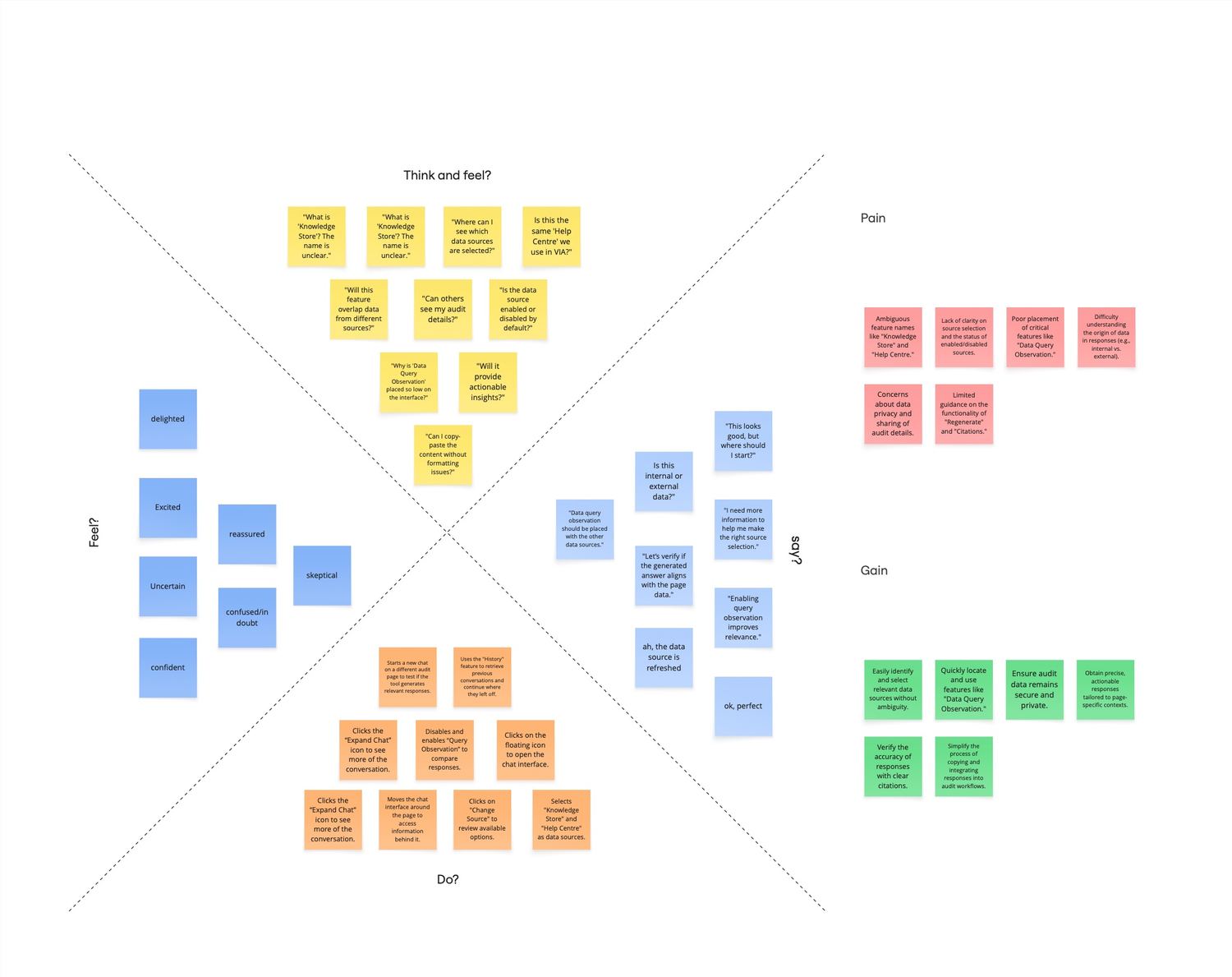
I synthesized the session data into a comprehensive empathy map, capturing the emotional arc of interacting with Genie's new features.

Think & Feel. Users moved through a predictable emotional journey — initial excitement and curiosity, midway confusion when encountering unclear labels ("Knowledge Store," "Data Query Observation"), and final reassurance when features were discovered and used effectively. The dominant questions in their minds: "Where can I see which data sources are selected?" and "Why is Data Query Observation placed so low?"

Pain points. Ambiguous feature names. Lack of clarity on whether sources were internal or external. Poor placement of Data Query Observation below the fold. Limited guidance on what "Regenerate" and "Citations" actually do. Concerns about data privacy — whether audit details could be seen by others.

Gains. Users could easily identify and select relevant data sources once they understood the options. They valued being able to verify response accuracy through citations. They appreciated that Page Awareness made responses more contextually relevant. They wanted the ability to copy and integrate responses directly into their audit workflows.

Empathy map with Think and Feel, Do, Say, Pain, and Gain quadrants populated with sticky notes
Fig 12Empathy map synthesizing user testing data — Think & Feel, Do, Say, Pain, and Gain quadrants reveal the emotional arc from initial confusion to confident adoption, with clear intervention points for design improvement.

Six patterns that shaped the redesign.

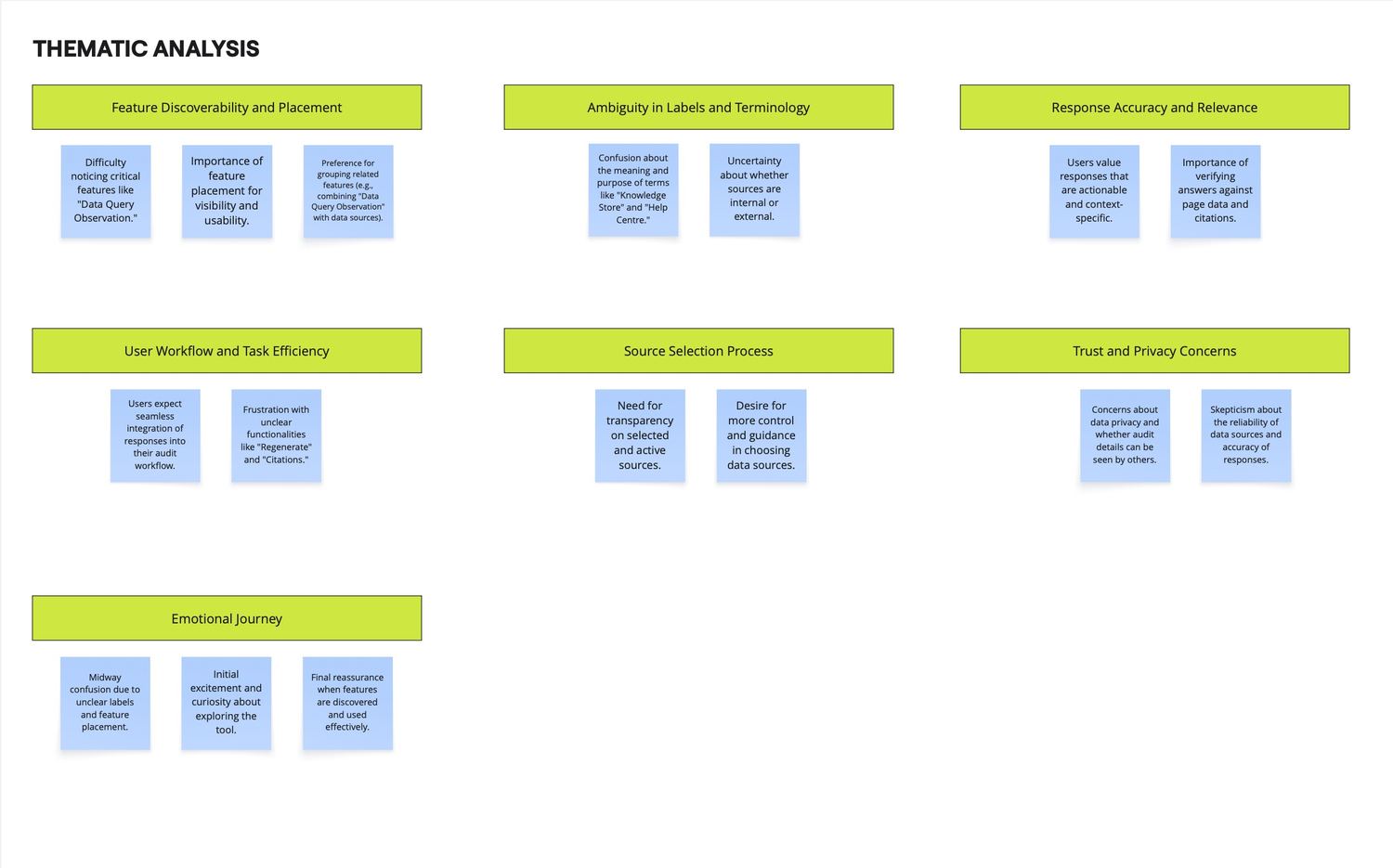
I coded the interview data and identified six recurring themes that cut across all testing sessions.

Theme 01
Feature Discoverability and Placement

Users had difficulty noticing Data Query Observation because it was positioned too low. They consistently preferred it grouped with the other data sources at the top, not separated as an afterthought near the input field.

Theme 02
Ambiguity in Labels and Terminology

"Knowledge Store" and "Help Centre" caused consistent confusion. Users couldn't distinguish between them or determine whether they were internal or external sources. "Data Query Observation" was unclear in both name and scope.

Theme 03
Response Accuracy and Relevance

Users valued responses that were actionable and context-specific, but they needed to verify AI outputs against page data and citations before trusting them. The ability to cross-reference was a prerequisite for adoption — not a nice-to-have.

Theme 04
User Workflow and Task Efficiency

Users expected seamless integration of AI responses into their existing audit workflow. Frustration emerged around unclear functionalities like "Regenerate" and "Citations" — features that could accelerate work but lacked sufficient explanation.

Theme 05
Source Selection Process

Users wanted transparency on which sources were active and more control and guidance in choosing data sources. The need wasn't just functional — it was about confidence. They needed to know why they should select specific sources, not just that they could.

Theme 06
Trust and Privacy Concerns

Concerns about data privacy surfaced repeatedly — specifically whether audit details could be accessed by others through the AI. Skepticism about the reliability of data sources and the accuracy of AI responses was a consistent undercurrent.

Thematic analysis board with six themes laid out as green column headers above blue sticky-note groupings
Fig 13Thematic analysis board — six themes emerged from coded interview data, each revealing a specific design intervention opportunity. The emotional journey pattern (excitement → confusion → reassurance) informed the overall redesign priority: reduce the confusion gap.

Four insight clusters. Direct design interventions.

I synthesized the thematic analysis into four actionable insight clusters, each with a corresponding design change.

Genie Expectations

Users treated Genie as a knowledge tool and expected it to explain how VIA works — not just answer document queries. They wanted an introduction to capabilities on first open, and they wanted to continue working on other pages while the AI processed responses.

Internet Cut-off

Users wanted to know the knowledge cut-off date when Internet was selected as a source. They also wanted clarity on whether selecting Internet meant they could ask about current events — and they expected the chat context to refresh when data sources changed, while understanding previous conversations could be accessed through history.

Source Clarity

Among all sources, only "Internet" was immediately understood. Users wanted to know whether each source was internal or external, wanted detailed descriptions to help them choose, and found "Knowledge Store" particularly confusing — they didn't understand it was GenIAus's document store.

Query Ambiguity

"Data Query Observation" needed more context since the name itself was unclear. Users preferred it positioned at the top alongside other data source options. They also wanted the ability to find in files, regenerate responses, and edit previous queries.

Research synthesis board with four green-headed columns: Genie Expectations, Internet Cut-off, Source Clarity, Query Ambiguity, each with blue sticky-note insights
Fig 14Research synthesis — four insight clusters distilled from user testing, each directly informing specific design changes in the next iteration. The clusters became the brief for the redesign sprint that followed.

Three concrete changes. Test, redesign, ship.

The research findings drove three concrete design changes. The carousel below cycles through the iterations — from Design A and Design B explorations to the final design and the mid-conversation source switching pattern.

Renamed "Data Query Observation" to "Page Awareness." The original name was engineer-speak that confused every user we tested. "Page Awareness" communicates what the feature actually does — it makes the AI aware of page content — in language users immediately understand.

Consolidated all data sources into a single dropdown. Instead of separating Page Awareness from other sources, I grouped it with Document Store, Help Center, and Internet in one checkbox list. This matched users' mental model — they saw all sources as a single decision, not two separate ones.

Added source labels and descriptions. Each data source got clearer naming and contextual descriptions so users could make informed selections without guessing whether a source was internal or external.

Embedded AI. Measurably adopted.

−60%Context-switching between tools — users no longer left VIA to access AI assistance
~45sTime-to-first-query, down from ~4 minutes with standalone GenIAus
72%Of users actively selected sources before prompting — strong adoption of the transparency model
58%Of all Genie sessions had Page Awareness enabled — validating the contextual layer
+28%Increase in user-reported trust rating, attributed to citations and source labels

Beyond the numbers, three directional outcomes shaped the project's success.

Reduced friction in AI adoption by meeting users in their existing workflows instead of asking them to adopt a new tool. The embedded model eliminated the context-switching that was the primary adoption barrier for GenIAus.

Increased user trust through three reinforcing mechanisms: source transparency (citations), user control (resource selection), and feedback loops (regenerate, rate, refine). Trust wasn't a feature — it was the cumulative effect of every design decision.

Established a scalable foundation for AI-driven interactions across EY's tool ecosystem. The three-layer integration model (widget → page awareness → deep integration) provided a reusable framework that other product teams could adopt without redesigning from scratch. Within six months, two additional VIA modules had adopted Genie's widget pattern and design system components.

Two questions. Two answers.

These two projects represent both sides of enterprise AI design — the standalone tool, and the embedded layer.

Case Study 01

GenIAus — build it.

Answered the question: Can we build an AI tool that auditors trust and use effectively? The answer was yes — with the right onboarding, prompt scaffolding, and information architecture.

Case Study 02

Genie — embed it.

Answered the harder question: Can we embed that intelligence into the tools auditors already use, without breaking their workflow or their trust? The answer was also yes — but it required a fundamentally different design approach: lighter touch, deeper context awareness, and a layered integration model that respected both the user's attention and the host tool's information density.

Together, they represent a complete AI design trajectory: from standalone to embedded, from feature-first to context-first, from building trust in a new tool to maintaining trust inside a familiar one.

What I'd do differently. What it taught me.

What I'd do differently

Invest in measuring response time by source configuration. The resource selection feature was designed partly to improve performance, but I didn't have instrumentation to validate whether narrower source scopes actually reduced response latency. That data would have strengthened the design rationale.

Prototype the Deep Integration layer earlier. The three-layer model defined the architecture, but only the Widget and Page Awareness layers shipped in my tenure. Starting the Deep Integration prototypes earlier would have de-risked the most complex and highest-value layer.

What it taught me

The best AI products don't feel like AI products. They feel like the tool you already use, but smarter. Genie's success wasn't measured by how often people opened the widget — it was measured by how naturally it fit into the work they were already doing.

Building for embedded AI is a design systems problem as much as an interaction design problem. Without the chat-focused component library, every future AI integration at EY would have started from scratch. The system was the product.

Next Case Study Peepal — designing for farmers in low-bandwidth, high-stakes environments →

Have a project in mind?

I'm open to senior product design roles, advisory work, and selective collaborations. Whether you have a defined brief or a fuzzy problem space, let's talk it through.

damleaalvee@gmail.com
Let's
create.